DailyStory Feature: Send a happy birthday message

People love receiving a happy birthday message. And sending a birthday email, text message, or push notification automatically to every customer on their birthday is genuinely simple with DailyStory.
What makes birthday messages worth setting up is the data behind them. Birthday emails generate 481 percent more transactions than standard promotional emails, with 342 percent higher revenue per email (Experian Birthday Email Report). Birthday messages produce an average order value more than four times higher than average, and they are among the most welcomed messages any brand can send because the timing is inherently personal and relevant.
Unlike promotional campaigns that require ongoing effort, a birthday automation is set up once and then runs on its own in the background, reaching every customer on exactly the right day, every year, without any manual work.
What makes birthday messages effective
A birthday message works because it arrives at a moment of genuine personal significance. The recipient is not being targeted because of a purchase behavior or campaign segment. They are being recognized as an individual on a day that matters to them. That distinction in intent is something customers notice and respond to.
The most effective birthday messages share three characteristics:
- They feel personal. Address the customer by first name and acknowledge the occasion directly. A birthday message that reads like a generic promotion undermines the moment. Personalized emails using the recipient's name and relevant data consistently outperform generic sends.
- They include a meaningful offer. A birthday discount, a free item, a bonus reward point, or an exclusive offer gives the recipient a concrete reason to act. The offer should feel like a gift rather than a promotion. "Here's a gift from us" converts better than "Use this coupon code."
- They arrive at the right time. On the day itself is the most emotionally resonant timing. Sending a few days before gives the recipient time to plan around the offer. Sending a few days after captures those who were too busy to act immediately. DailyStory's date trigger supports all three approaches.
Birthday messages also contribute to long-term customer loyalty. A customer who receives a genuine birthday message from a brand is more likely to remember that brand positively, return for a future purchase, and recommend the business to others.
Set up birthday automation in DailyStory
Setting up automated birthday messages in DailyStory takes just a few minutes and involves three steps: create a campaign, create the message, and set up the Autopilot workflow. Once active, the automation handles everything else.
Step 1: Create a new campaign
Create a new campaign in DailyStory called something like "Birthday Reminders" or "Happy Birthday Campaign." Add the audience segments of the people you want to receive birthday messages. For most businesses, this will be your active customers or members. If you have multiple customer types, you can create separate birthday campaigns with different offers for each segment.
The campaign structure keeps your birthday automation organized and separate from other ongoing campaigns, making it easy to review performance and make adjustments without affecting other workflows.
Step 2: Create the birthday message
Create the birthday message you want to send. DailyStory supports three channel options for birthday messages:
- Email: The most versatile option, supporting rich design, images, longer copy, and dynamic content. An email gives you the most room to include a personalized greeting, a compelling offer, and a clear call to action. Use personalization tokens to include the customer's first name in both the subject line and the body. For design guidance, see our article on 7 tips for effective email design.
- Text message: A birthday text message feels immediate and personal. SMS has a 98 percent open rate, and a birthday text with a simple offer ("Happy birthday, [Name]! Use code BDAY20 for 20% off today only") can drive quick conversions. For tips on writing effective SMS messages, see our guide on how to write an effective marketing text message.
- Push notification: If your customers use your mobile app, a birthday push notification is a low-friction, high-visibility option. Keep it short, warm, and personal. For push notification best practices, see our article on 7 tips to write an effective push notification.
You can also create all three and use them together in a sequence: send an email in the morning, follow up with an SMS if the email is not opened by the afternoon, and send a push notification to app users as a final touchpoint. This multi-channel approach maximizes reach across your entire customer base.
Whatever channel you choose, include the customer's first name, a specific offer, a clear expiry, and a single call to action. The simpler and more direct the message, the higher the conversion rate.
Step 3: Add an Autopilot workflow to your campaign
Add an Autopilot workflow to the campaign. Use the "When today's date is" trigger and set it to the customer's birthday date field. You can configure the trigger to fire a specific number of hours, days, or months before or after the birthday date, or set it to zero to send on the actual birthday.
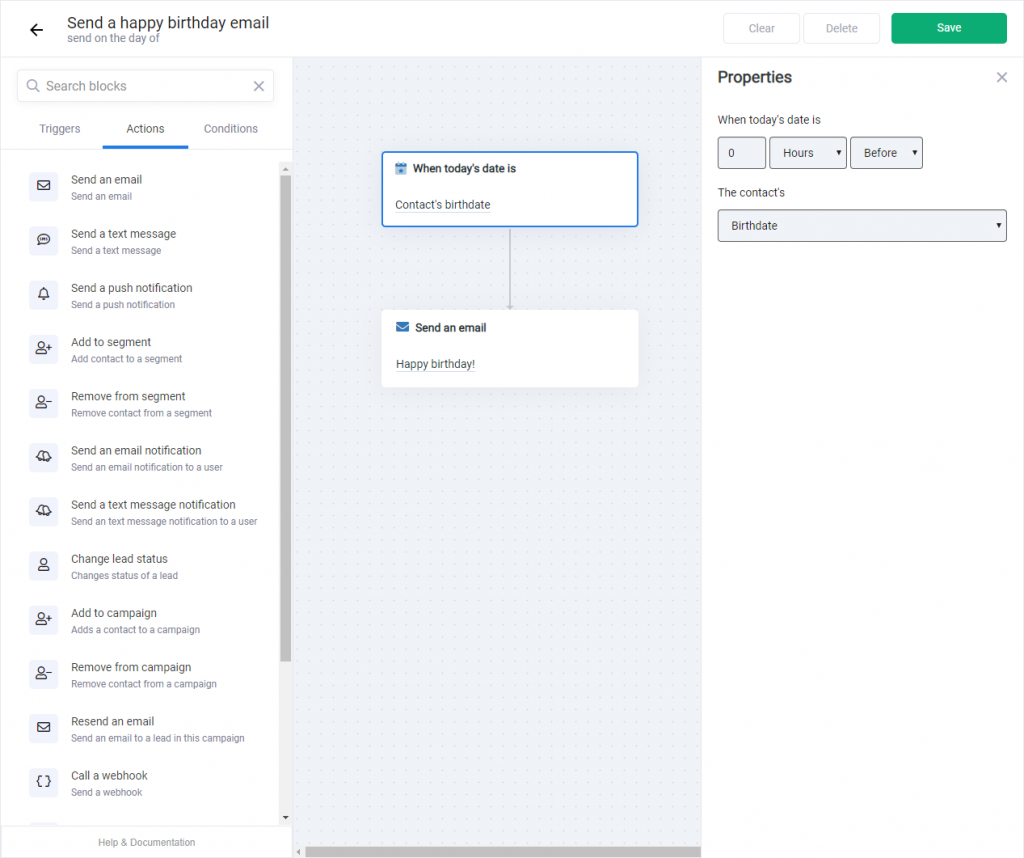
Next, add an action such as "Send an email" and select the birthday email you created in step 2. If you are sending a text message or push notification instead, choose the corresponding action type.
Click "Save" and enable the automation. That is all. DailyStory will automatically check each customer's birthday date every day and send the message on the configured schedule.
Birthday message ideas and subject line tips
The message itself makes the biggest difference in whether a birthday automation converts or just passes unnoticed. Here are proven approaches for each element:
Subject lines for birthday emails
- "Happy Birthday, [First Name]! Your gift is inside"
- "It's your day, [First Name]. We have something for you"
- "A little something for your birthday"
- "Your birthday treat expires tonight, [First Name]"
- "[First Name], celebrate with 20% off today only"
Avoid generic subject lines like "Happy Birthday!" with no personalization or offer signal. The best birthday subject lines combine the recipient's name with a clear indication that something is waiting for them. For more subject line guidance, see our article on 12 tips for email subject lines that won't get ignored.
Offer ideas for birthday messages
- A percentage discount (20% or 25% off) valid for one to three days
- A fixed dollar amount off the next purchase
- A free item or free upgrade with any purchase on their birthday
- Bonus loyalty points or reward credits added to their account
- Free shipping on any order placed on their birthday
- Access to a members-only product or experience
The offer should feel proportionate to your customer relationship. A loyal, high-value customer deserves a more generous birthday offer than a cold prospect. If your customer data supports it, use segmentation to send different birthday offers to different customer tiers within the same campaign framework.
Make sure you have birthday data
The automation will only fire for contacts who have a birthday date stored in their DailyStory profile. If you do not yet have birthday data for your customers, there are several ways to collect it:
- Add a date field to your signup or account creation form asking for date of birth or birth month
- Run a short survey or preference update email asking customers to share their birthday in exchange for a birthday reward
- Import birthday data from your CRM, point-of-sale system, or booking platform using DailyStory's CSV import or API
- Add a birthday field to your membership or loyalty program enrollment form
You do not need the full date of birth. In many cases, collecting just the month and day is sufficient and more privacy-friendly. Customers are generally willing to share their birthday when there is a clear benefit (a birthday offer) attached to doing so.
Birthday automation as part of a broader lifecycle strategy
Birthday messages are one example of a wider category of date-triggered lifecycle automations that DailyStory supports. The same "When today's date is" trigger pattern works for:
- Anniversary messages: Recognizing the date a customer first joined, made their first purchase, or signed up for your service. Revenue per email from anniversary sends is nearly seven times that of bulk mailings.
- Membership renewal reminders: Automated reminders sent a set number of days before a membership or subscription expiry date.
- Re-engagement triggers: Sending a message when a customer has not interacted with your business for a defined period of time.
- Post-purchase follow-ups: Timed messages sent a set number of days after a purchase, useful for requesting reviews, offering complementary products, or checking in on product satisfaction.
Each of these automations, like the birthday message, requires setup once and then runs indefinitely. Together they form a lifecycle automation program that maintains consistent, personalized communication with your customers throughout their entire relationship with your business.
For a broader look at how automation can transform your marketing, see our guide on 5 ways to approach automation in your marketing strategy.