Drag-and-drop web form builder to capture leads.

DailyStory’s drag-and-drop form builder lets you create mobile-friendly web forms without writing a line of code. Self-host them, embed them on any page, or link from a QR code — and every submission automatically creates or enriches a contact, starts an automation, and adds a lead to your campaign.

  • Drag-and-drop designer — no development required
  • Self-hosted or embedded — works on any website or landing page
  • Every submission creates contacts, enriches data, triggers automations
  • Google reCAPTCHA support — keep robots out automatically

DailyStory Web Forms
Drag-and-drop — no code required
Self-hosted or embedded anywhere
Submissions trigger automations instantly
Google reCAPTCHA built in
Mobile-friendly out of the box
Drag-and-drop designer

Build any form in minutes — no developer needed.

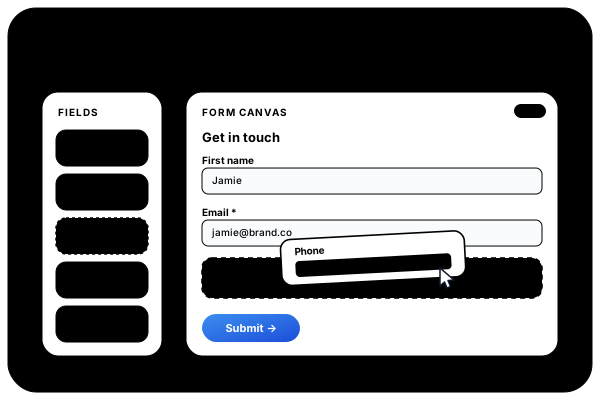
Add fields by dragging them from the palette onto the canvas. Reorder them by dragging again. Configure labels, placeholders, validation rules, and custom field mappings from the properties panel. When you’re done, publish instantly — DailyStory hosts the form for you, or generate an embed snippet for your own site.

  • Text, email, phone, textarea, dropdown, checkbox, radio
  • Drag to add, drag to reorder — live canvas preview
  • Required field validation — set per field
  • Map any field to a standard or custom contact property
  • Self-hosted URL — ready to share immediately after publish
  • Embed snippet — works on any website, WordPress, landing page
Drag and drop Web Forms
On submission

Automated Actions on Every Form Submission.

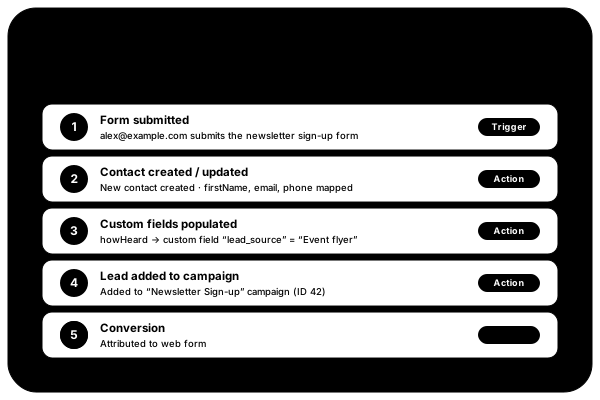
A form submission isn’t just data collection — it’s the start of a relationship. When someone submits a DailyStory web form, the platform immediately checks whether the contact exists, creates or updates their record, enriches it with the submitted data, adds them to the campaign, and fires any automation enrolled on that campaign. All of this happens in milliseconds, with no manual work.

  • New contact? Created automatically with submitted data
  • Existing contact? Their record is enriched, not duplicated
  • Lead added to the campaign the form is associated with
  • Automation fires instantly — welcome emails, SMS, sequences
  • Custom fields populated from mapped form inputs
  • Tags applied based on submission content or source
Automation
Placement & use cases

One builder — every context where you need to collect leads.

Web forms aren’t one-size-fits-all. DailyStory forms work wherever you need them — embed them on a landing page, link a QR code to a self-hosted form at an event, place them in a WordPress post, or link from an SMS message. Each form is tied to a specific campaign so all leads are automatically attributed.

  • Self-hosted URL — shareable link, no embedding required
  • Embed on any HTML page, WordPress, Webflow, or Squarespace
  • QR code auto-generated — print on flyers, menus, packaging
  • SMS link — send form URL in a text message campaign
  • Email link — include form URL in a broadcast or automation
  • Popup trigger — open a form inside a DailyStory popup
Web form use cases
Self-hosted URL
DailyStory hosts the form — just share the link
Embed snippet
2-line script tag works on any website
QR code
Auto-generated — print on physical materials
SMS campaigns
Link form URL in text message broadcasts
WordPress
Native plugin for one-click form embedding
Popup / overlay
Trigger a form inside a DailyStory popup
Minutes to build < 5
Code required None
Mobile friendly
Everything included

Web Form Builder Features: Drag-and-Drop, Webhooks & Auto-Responders.

Web forms are built into DailyStory alongside email, SMS, automation, and all other features. No form plugin to buy, no submission limits, no branding watermarks.

Drag-and-drop designer
Build forms visually — add, reorder, and configure fields with no code.
Mobile-friendly by default
All forms render correctly on any screen size without extra configuration.
Self-hosted URL
Every form gets a shareable URL hosted by DailyStory — no website needed.
Embed on any site
Two-line script tag embeds the form on any HTML page, WordPress, or CMS.
Google reCAPTCHA
Add reCAPTCHA v2 or v3 with a single drag-and-drop — no API key setup needed.
Contact create & enrich
New contacts are created on submission; existing records are enriched, not duplicated.
Custom field mapping
Map any form field to a standard or custom contact property in one click.
Automation trigger
Form submission fires any automation enrolled on the associated campaign.
Submission analytics
View submission counts, source attribution, and field-level completion rates.
QR code auto-generated
Every form URL automatically gets a downloadable QR code for print use.
WordPress plugin
Native WordPress plugin — embed any form in a post or page with a shortcode.
Tags on submission
Apply contact tags based on which form was submitted or what data was entered.
Common questions

Web form FAQs

A Web Form is a form you build from scratch using DailyStory’s drag-and-drop designer — you control every field and layout. A Magic Form automatically detects and connects to forms that already exist on your website, so you don’t need to replace or rebuild them. If you have a custom form you want to keep, use Magic Forms. If you’re building a new form, use Web Forms.
No. The form designer is entirely drag-and-drop — you add fields by dragging them from the palette, configure them in the properties panel, and publish with one click. DailyStory hosts the form for you. If you want to embed it on your own site, you copy a two-line snippet and paste it where you want the form to appear — no other code needed.
Several things happen automatically: if the contact doesn’t exist, it’s created from the submitted data. If the contact already exists, their record is enriched with any new information. A lead is added to the campaign the form is associated with. Any custom fields you’ve mapped from form inputs are populated. And any automation enrolled on that campaign fires immediately — a welcome email, an SMS, a multi-step nurture sequence, or whatever you’ve configured.
Yes. Any custom field you’ve created in DailyStory can be mapped to a form field. When the form is submitted, the value entered by the visitor is saved directly to that custom field on the contact record. These custom fields are then available as segment criteria, merge tags in campaigns, and data visible in the contact timeline.
Yes. Every web form’s self-hosted URL is also a DailyStory shortened URL, which means it automatically gets a QR code. Download the QR code and print it on flyers, signage, menus, packaging, or anywhere you want visitors to scan and fill out the form. Scans and form submissions are tracked together.
Yes — this is one of the most powerful things about DailyStory web forms. Each form is associated with a campaign. Any automation you’ve enrolled on that campaign will fire the moment a form is submitted. You can build simple auto-responders (send a welcome email) or complex multi-channel sequences (email → wait 2 days → SMS → check engagement → branch based on behaviour).
Get started today

Build Your First Lead Capture Form in Under 5 Minutes.

Start your 14-day free trial — drag, drop, publish. Every submission creates contacts and fires automations automatically. No credit card required.

14-day free trial  ·  Plans from $100/mo  ·  Web forms included on all plans  ·  No credit card required