WordPress popup plugin for easy-to-add popups

Popups remain one of the most effective tools for converting website visitors into leads and subscribers. When designed thoughtfully and triggered at the right moment, a well-placed popup can grow your email list, recover abandoning visitors, and increase your sales conversion rate significantly. The average popup conversion rate in 2026 is 4.82 percent, and the top 10 percent of optimized popup campaigns convert over 26 percent of visitors.
For WordPress users, adding professional popups to your site does not require coding skills or a separate plugin subscription. The DailyStory WordPress plugin connects your site directly to DailyStory’s popup builder, giving you full control over design, targeting, triggers, lead capture, and automation from one platform.
Why website popups work
The data behind popup performance is compelling. Exit-intent popups capture 137 percent more subscribers than passive embedded forms. Popup forms convert two to three times better than inline email signup forms at the same baseline opt-in rate, and adding a lead magnet doubles that advantage further. Popups with a discount offer converted at 2.4 percent in 2025, compared to 1.7 percent for popups without any incentive.
The key variables that determine whether a popup helps or frustrates your visitors are timing, targeting, relevance, and offer quality. A generic “Subscribe to our newsletter” popup converts at 1 to 2 percent. A specific, well-timed lead magnet offer (“Download our free guide”) converts at 5 to 8 percent. Understanding the different popup types and when to use each one is where the real gains come from.
Types of popups you can add to WordPress
DailyStory supports two primary popup formats for WordPress sites, each suited to different conversion goals.
Exit intent popups
An exit intent popup is triggered when a visitor’s cursor moves toward the browser’s address bar or close button, signaling they are about to leave. This is the highest-impact popup type for lead recovery and cart abandonment. Cart abandonment exit popups achieve an average conversion rate of 17.12 percent, making them one of the most valuable tools for e-commerce sites.
Exit intent popups work because they interrupt the visitor at the precise moment of departure, without interfering with their browsing experience before that point. A visitor who was already leaving has nothing to lose by engaging with a relevant offer.
Welcome mats
A welcome mat is a full-screen overlay displayed when a visitor first arrives on your site or a specific page. Welcome mats are highly visible and work well for high-priority offers, major announcements, or lead magnets you want every visitor to see. Because they take over the full screen, they should be used selectively and always include a clear, easy way to dismiss them.
Other popup trigger types to consider
Beyond exit intent and welcome mats, modern popup strategy includes several other trigger types that can be configured in DailyStory and activated through the WordPress plugin:
- Scroll-triggered: Displayed after a visitor scrolls a set percentage of the page, such as 50 percent or 75 percent. This targets engaged readers who have already demonstrated interest in the content
- Time-on-page: Shown after a visitor has spent a defined number of seconds on a page. Popups displayed after 11 to 15 seconds achieve the highest conversion rate, according to Wisepops benchmark data from over 1 billion popup displays
- Page-view based: Triggered after a visitor has viewed a set number of pages. Visitors who reach a second page are significantly more engaged and convert at higher rates
- Click-triggered: Activated when a visitor clicks a specific button, image, or link. Fully user-initiated and the least intrusive format
Add popups to your WordPress website
Adding a popup for exit intent or as a welcome mat to WordPress is straightforward with DailyStory. Install the plugin and follow the steps below.
Step 1: Install the DailyStory plugin for WordPress
Install the DailyStory plugin for WordPress. This automatically installs the DailyStory beacon on your site: a lightweight JavaScript snippet that allows your WordPress site to communicate with DailyStory. The beacon is designed to load asynchronously so it does not affect your page speed or Core Web Vitals scores.
WordPress popup plugin links
Useful resources for the DailyStory WordPress plugin:
- Learn more about the DailyStory WordPress plugin
- View in the WordPress plugin directory
- JavaScript API installed by the DailyStory WordPress plugin
- Source code on GitHub
In addition to popups, this plugin also enables embeddable web forms and magic forms. For more detail on using DailyStory forms within WordPress pages and posts, see our guide on WordPress and DailyStory marketing automation integration.
Step 2: Create a popup in DailyStory
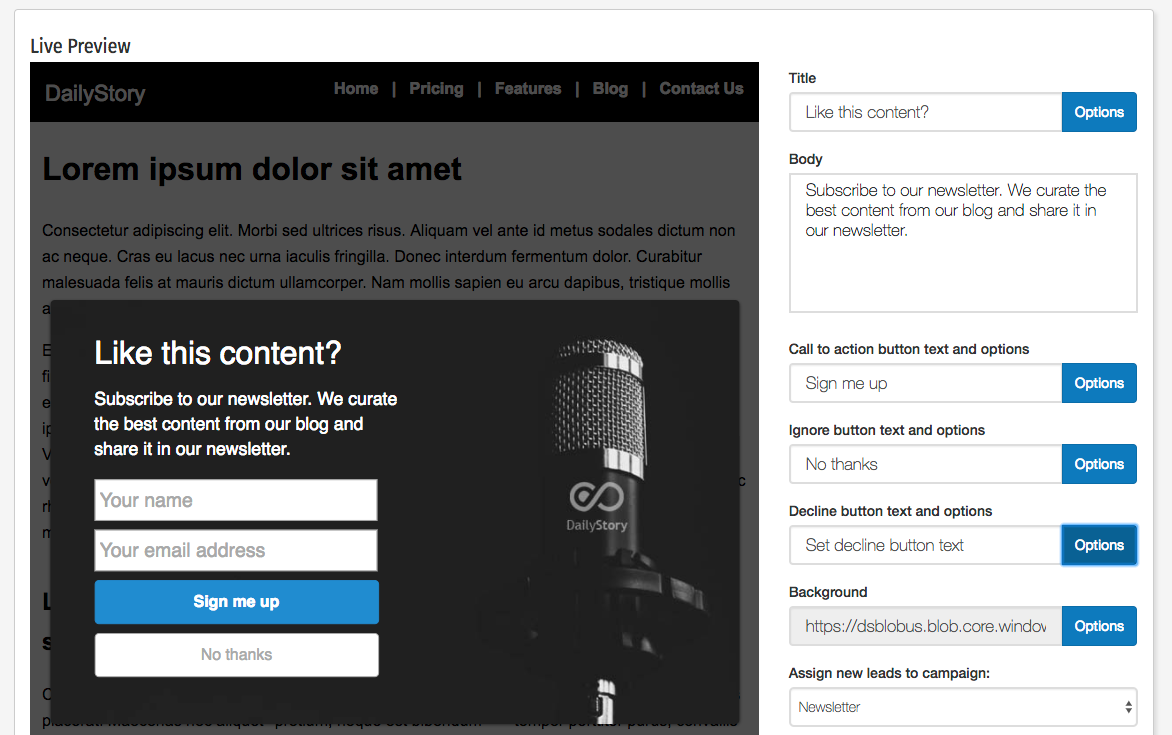
Once the plugin is installed, create your popup inside DailyStory. The example below is an exit intent popup configured for www.dailystory.com to encourage visitors to sign up for a newsletter.
The popup is designed and configured in the DailyStory popup editor:
Step 3: Control where the popup is shown
In the DailyStory popup editor, configure exactly which pages the popup appears on. You can target the popup to show on all pages, specific URLs, or particular content types. The DailyStory WordPress plugin reads this configuration and handles showing your popup only on the pages you specified, without any additional code required on your end.
Page-level targeting is one of the most important levers for popup performance. A popup about a specific product category should appear on that category’s pages, not site-wide. Relevance between the popup offer and the page content consistently improves conversion rates.
Step 4: Capture leads automatically
When visitors interact with the popup, DailyStory automatically creates a new lead and adds them to the campaign associated with the popup. In the newsletter example above, submitting the popup adds the contact to a Newsletter campaign.
The campaign then sends a thank-you email and adds the new subscriber to the newsletter segment. This entire process is automatic. No manual work is required after the initial setup. Every popup submission flows directly into your audience segments and email drip campaigns.
If a visitor dismisses the popup, DailyStory records that dismissal and suppresses the popup for that visitor for a set period (typically 30 days) across the entire site, preventing repeated interruptions that would frustrate returning visitors.
Step 5: Run automations after popup submission
Once a lead is captured through the popup, you can trigger automations to run immediately. Automations can be configured to fire when the popup is submitted, when the contact is added to a campaign, or through a range of other triggers and actions. Common automation flows that work well with popup-captured leads include:
- A welcome email sequence that introduces new subscribers to your brand over several days
- A lead magnet delivery email that immediately sends the resource promised in the popup offer
- A qualification sequence that asks new subscribers about their interests to improve future segmentation
- A sales notification to alert your team when a high-intent popup (such as a demo request or pricing page popup) is submitted
Pairing popup lead capture with drip email sequences is one of the most effective combinations in digital marketing. The popup gets the contact; the automation builds the relationship.
Popup analytics in DailyStory
Tracking popup performance is a core part of optimizing your results. DailyStory provides analytics for every popup, showing you how it is performing over time:
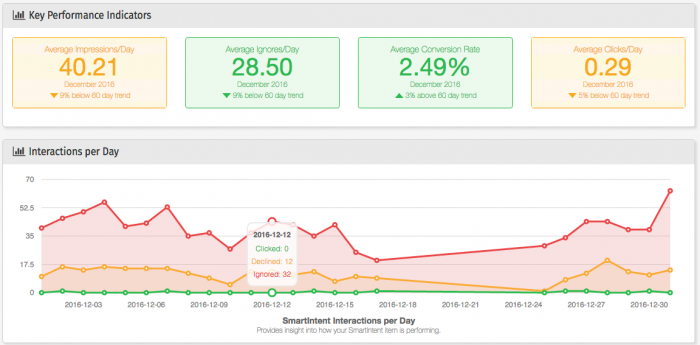
The analytics report tracks impressions, interactions, and conversions for each popup. Combined with the list of individual converted leads, you have a complete picture of exactly which visitors engaged, what page they were on, and what campaign they entered. These leads can be managed directly within DailyStory or pushed to your CRM, such as Salesforce, through DailyStory’s integrations.
Advanced: Show a popup using the JavaScript API
For developers who need more control over popup display logic, DailyStory also provides a JavaScript API. This allows you to trigger a popup programmatically based on any condition your code can detect, rather than relying on the standard behavioral triggers.
The DailyStory JavaScript API is available anywhere the beacon is installed. Learn more about the DailyStory JavaScript API.
For example, you can listen for the event raised when the beacon JavaScript is fully loaded and then trigger a specific popup when certain conditions are met, such as when a user reaches a specific scroll depth, completes a form step, or performs a custom interaction.
Show a popup with the JavaScript API
You can use the DailyStory JavaScript API to display a popup when the page loads or when any custom condition is met. The DailyStory WordPress plugin source code on GitHub includes a working example of this approach.
WordPress shortcodes for popups
You can also force a specific popup to appear on any WordPress post or page using a shortcode. Add the following to any post or page content to trigger an exit intent popup by its ID:
[ds-exitintent id="29"]
Replace 29 with the ID of your popup as shown in the DailyStory popup editor. This approach is useful when you want a specific popup to appear on a specific piece of content, regardless of the global targeting rules configured in DailyStory.
Popup best practices for 2026
Getting the most from your WordPress popups means following a few key principles that separate high-converting campaigns from ones that frustrate visitors.
- Match the offer to the page. A popup triggered on a blog post about email marketing should offer something relevant to that topic, such as an email marketing checklist. Generic site-wide offers consistently underperform page-specific ones. This connects directly to your broader content marketing lead generation strategy.
- Use a lead magnet. Adding a specific, valuable resource to your popup offer (a checklist, guide, template, or discount code) can increase conversion rates from around 1 to 2 percent to 5 to 8 percent. The more specific and useful the offer, the higher the conversion.
- Keep the form short. Single-field popups asking only for an email address outperform longer forms in most contexts. If you need more information, use a multi-step popup: collect the email in step one, then ask for additional details in step two.
- Time it thoughtfully. Popups displayed after 11 to 15 seconds on page consistently outperform immediate popups. Give visitors time to read and engage with your content before interrupting them.
- Design for mobile. Over 60 percent of web traffic is now mobile. Mobile popups convert at 4.98 percent versus 3.67 percent on desktop in 2026, a 36 percent advantage, but only when the popup is properly optimized for small screens. Use a full-width layout on mobile, ensure the close button is large enough to tap easily, and avoid covering the entire viewport on load.
- Respect Google’s Page Experience guidelines. Google penalizes intrusive interstitials that block content immediately on page load, particularly on mobile. Exit intent and scroll-triggered popups are generally safe because they respond to visitor behavior rather than interrupting the initial page load. Always verify your popup implementation against Google’s mobile usability standards.
- Set suppression rules. DailyStory automatically suppresses a popup for visitors who have already converted or dismissed it. Make sure your suppression window is set appropriately (30 days is a common standard) to avoid repeatedly showing the same popup to returning visitors.
- Test continuously. The top 10 percent of popup campaigns achieve 26.83 percent average conversion rates through active A/B testing. Test one variable at a time: headline copy, offer type, trigger timing, or button color. Even a small improvement compounded across all your traffic produces significant list growth over time.
When popup strategy is connected to a full marketing automation platform, the results go well beyond a growing email list. Every lead captured through a popup becomes the entry point for a well-designed conversion journey that nurtures the contact from initial interest through to a sale. That is where DailyStory’s integration of popups, automation, segmentation, and analytics creates compounding value over time.
Ready to add high-converting popups to your WordPress site? Install the DailyStory WordPress plugin, then schedule a free demo to see the full popup, automation, and lead management platform in action.